


Pushing projects past 2018
6:11 AM
More coming up and thank you for staying with us. For enquiries, please contact +6738288020. Thank you.
 The production units are substantially better than where we started with the Beta units. Based on the feedback we had from Beta testing we made several important changes. Here are some highlights:
 Lead time is around 10 days right now, until we sell out of existing stock. Please order now to avoid disappointment, we will only get stock again in 6-8 weeks.
To all the Beta testers : thanks for your valuable inputs so far, if you haven’t yet, you need to complete the online results form.
blue leader, out !


| HD NORM: | Suitable for HD recording |
| LOW: | Works to flatten out a high contrast scene |
| SD NORM: | Normal setting for SD (this was available in the DVX100 series) |
| HIGH: | Provides more contrast and color gradation |
| B.PRESS: | Provides more contrast and blacks in low contrast scenes |
| CINE-LIKE D: | The Cine-Like mode shifted to prioritize dynamic range |
| CINE-LIKE V: | The Cine-Like mode shifted to prioritize contrast |

 Casting Call: Pride of the Dragon 龙的尊严


 |
Produser filem elak bergantung dengan teknologi canggih hingga abaikan kualiti karya
FESTIVAL Filem Malaysia Ke-22 (FFM22) yang berakhir di Kota Kinabalu, Sabah semalam seharusnya dijadikan medan mencari formula bagi memajukan jalan cerita sesebuah filem tempatan untuk menjadikannya sesuatu yang luar biasa tanpa terlalu bergantung kepada aplikasi teknologi.
Pensyarah Kanan Jabatan Pengajian Media Universiti Malaya (UM), Dr Abu Hassan Hasbullah, berkata komponen utama dalam memastikan sesebuah filem itu berjaya bukan terletak pada teknologi pembikinan semata-mata, sebaliknya jalan cerita yang dihasilkan.
“Filem bukan mesin tetapi suatu karya seni yang harus bercerita dengan sendirinya. Orang Mongolia boleh berbangga dengan filem mereka, begitu juga Thailand. Jika kita bercakap fasal teknologi seperti CGI (Imej Janaan Komputer) dan sebagainya, mereka lebih dulu menggunakannya daripada kita.
“Mengapa filem mereka boleh berjaya di negara sendiri dan peringkat antarabangsa. Semuanya sebab jalan ceritanya kuat dan menarik. Kenapa harus dibanggakan sangat penggunaan CGI dan teknologi penggambaran lain sedangkan aspek yang harus dititikberat ialah jalan cerita,” katanya.
Katanya, di mana-mana saja industri perfileman di seluruh dunia, hampir semua teknologi penggambaran yang digunakan adalah sama tetapi yang membezakan sesebuah filem itu ialah jalan ceritanya.
“Itu yang membezakan filem kita dengan negara lain. Penggunaan teknologi tidak sepatutnya dijadikan kayu pengukur sama ada filem kita bagus atau tidak. Sebab itulah, dalam mana-mana festival (filem) pun, penilaian lebih bertumpu kepada jalan cerita atau screenplay, bukannya teknologi.
“Lagipun, kita bukan bercakap fasal persaingan teknologi di sini. Malah, kebolehan untuk mencapai semua teknologi itu bukannya payah. Sebaliknya, jalan cerita yang memainkan peranan penting dalam menjadikan karya kita unik dan berbeza dari negara lain,” katanya.
Beliau turut melihat penganjuran festival kali ini selari dengan perubahan iklim politik di dalam negara, selain ekonomi dan sosio-budaya masyarakat, terutama dari segi peningkatan jumlah penyertaan yang disifatkan tertinggi dalam sejarah penganjuran FFM.
“Diakui, transformasi ini cukup unik, terutama pada naskhah filem dihasilkan walaupun penerokaannya masih bersifat komersial dan belum mencapai tahap intelektual. Namun, apa yang penting di sini bukanlah jumlah filem yang dihasilkan, sebaliknya pencapaian boxoffice filem berkenaan di pawagam.
“Ini yang perlu difahami bagi memastikan zaman kejatuhan filem tempatan sekitar 80-an dan 90-an dulu tidak berulang. Kita mungkin boleh `berpekik’ apabila filem kita berjaya di pawagam kerana kebetulan ada ruang kosong ketika itu apabila tiada persaingan dari produksi besar Hollywood.
“Atau, ia turut dipengaruhi penayangan filem dari seberang yang menarik audien ke pawagam hingga mereka menganggap filem Melayu sudah berada pada tahap terbaik sedangkan masih banyak yang perlu diperbaiki, terutama pada aspek jalan cerita,” katanya.
Katanya, bukan menjadi satu kesalahan jika penggiat filem tempatan bercita-cita tinggi mahu membawa karya masing-masing ke persada dunia seperti tema yang dipilih bagi penganjuran festival kali ini, malah tidak mustahil hasrat itu mampu dicapai jika diusahakan.
“Memangnya kita selalu menginginkan filem kita ke persada dunia. Ia tidak salah, malah bukannya mustahil untuk dijayakan,. Namun, yang paling penting sesebuah filem haruslah berjaya di negaranya sendiri terlebih dulu.
“Apa guna menang sampai 40 anugerah di peringkat dunia kalau tidak ditayangkan atau gagal di negara sendiri. Kesimpulannya, anugerah bukan sebagai penentu, sebaliknya penerimaan masyarakat terhadap sesebuah filem. Itulah penanda aras yang sebenarnya,” katanya.
FFM22 - Kota Kinabalu 2009 dianjurkan Perbadanan Kemajuan Filem Nasional (Finas), Persatuan Pengeluar Filem Malaysia (PFM) dan Gabungan Persatuan Karyawan Filem Malaysia (Gafim), selain mendapat kerjasama Kementerian Pelancongan, Kebudayaan dan Alam Sekitar Sabah.
Ia yang kali pertama berlangsung di luar Semenanjung sejak mula dianjurkan pada 1981, turut mencatatkan sejarah tersendiri apabila menerima jumlah penyertaan terbanyak iaitu 193 karya untuk dipertandingkan, masing-masing filem cereka, digital, dokumentari, animasi serta filem pendek.
Produser perlu ubah budaya pemikiran
SEMENTARA itu, Ketua Pengarah Finas, Mahyiddin Mustakim, berkata pemilihan tema Filem Malaysia Ke Persada Dunia bukan bermaksud mahu mencari filem tempatan untuk dihantar ke luar negara, sebaliknya lebih kepada usaha meningkatkan kualiti karya tempatan agar menepati standard antarabangsa.
“Ia perlu dilihat dari skop lebih meluas, membabitkan segala aspek dalam proses penerbitan filem. Ia bermula seawal proses penulisan dan pembangunan skrip, diikuti aplikasi teknologi penggambaran terkini, pasca produksi, seterusnya urusan pemasaran dan pengedarannya.
“Sebenarnya, objektif utama pemilihan tema itu adalah untuk meningkatkan kualiti filem tempatan. Kita mahu produser kita menghasilkan lebih banyak filem yang berpotensi dibawa ke luar negara, sekali gus membuka pasaran lebih luas dengan syarat mesti berjaya di negara sendiri terlebih dulu,” katanya.
Bagi menjayakan misi itu, katanya, mereka yang terbabit dalam kerja perfileman perlu mengubah budaya pemikiran bahawa setiap filem dihasilkan bukan sekadar untuk tayangan tempatan, sebaliknya mempunyai potensi ke pasaran luar negara.
“Diakui, memang ada produser tempatan yang mengambil inisiatif memasarkan filem ke negara luar, dengan ada di antaranya belum ditayangkan di negara sendiri pun. Kami menyokong usaha ini tetapi tidak ramai produser yang berani melakukannya disebabkan beberapa faktor penghalang.
“Justeru, dalam beberapa siri pertemuan dengan pihak produser sepanjang festival ini berlangsung, Finas ada memberikan penerangan mengenai bentuk bantuan yang boleh diperoleh dari kerajaan dalam menjayakan usaha itu, bukan saja membabitkan filem cereka tetapi filem dokumentari,” katanya.
Beliau berkata, melihatkan pencalonan filem yang bertanding kali ini, beliau turut merumuskan memang berlaku tranformasi yang cukup ketara dalam industri perfileman tempatan, bukan saja dari segi teknologi penggambaran, malah genre filem yang diterbitkan.
“Banyak genre filem wujud sekarang ini, sekali gus menawarkan lebih pilihan kepada penonton. Saya melihat ada keberanian di kalangan produser kita menerbitkan filem aksi, fantasi dan animasi yang menggunakan pelbagai teknologi penggambaran terkini.
“Perubahan ini cukup drastik berbanding tiga tahun lalu, di mana ketika itu pasaran filem tempatan lebih terhad kepada filem cinta, romantik dan komedi. Bagi saya, ini satu perkembangan baik, yang mampu memberikan implikasi positif terhadap pertumbuhan industri perfileman kita,” katanya.
It has been more than two long years since Apple released Final Cut Pro 6 ( ), its flagship pro-level nonlinear video editing app. While there are a few extremely sexy new features in Final Cut Pro 7— among them new ProRes flavors, iChat Theater, and Easy Export that will attract lots of attention—the main focus of this new version seems to be enhancing stability, speed, and productivity.
ProRes, a high-definition lossy video compression format developed by Apple for use in post production, was introduced in 2007 with Final Cut Pro 6 (FCP). The new variations are designed to broaden the codec family’s capabilities into higher-end post production, news markets, and offline editing. In the most compelling new feature of this release, Apple builds on the success of its excellent ProRes codec family by adding three new flavors: ProRes 4444, ProRes 422 (LT), and ProRes 422 (Proxy). ProRes 4444 is designed for highest end work or compositing with alpha channel. The LT version is for lightweight deliverables, such as broadcast, while the 422 (Proxy) is specifically for offline editing. That’s in addition to the two flavors for “normal” editing and finishing—the regular flavor for most projects, and the HQ for higher end quality, which are still included from the previous version.
ProRes 4444 For video editors like me who try to push FCP as far as it can go, there is now a ProRes codec for working with high end formats (think HDCAM SR or Redcode) or for higher quality when rendering from FCP or other programs, specifically compositing applications. ProRes 4444 supports either the traditional Y'CbCr video color space or RGB at full 4:4:4 color sampling, at up to 12 bits per pixel according to Apple. Wait, what is the fourth four for? It is for your alpha channel, and yes, Virginia, they did it right and it does have 10 bits per pixel as well. This codec runs at 330 megabits per second in a “worst-case scenario” of 1080i60 video, not including the alpha channel. The alpha is “mathematically losslessly encoded” Apple says, at a variable data rate, which hints that the codec is using some kind of compression that makes the file size smaller than an uncompressed alpha channel but of identical quality.
ProRes 422 (LT) If you know the regular ProRes 422, you like it, you use it, then think of this as ProRes 422 on a bandwidth diet. So why bother? Turns out a lot of broadcast equipment is built around 100 megabits per second pipelines—Panasonic started it with the Varicam and its DV100 (aka DVCPRO HD) codec, and continued with its AVC-Intra codec, both of which run at a maximum data rate of 100 megabits per second. So a lot of folks had their digital plumbing set up for 100 megabits per second, and regular ProRes 422, which can run up to 145 megabits per second for 1080i60 footage, could gum up the works since it was nearly 50 percent larger than the anticipated data rate. So along comes ProRes 422 (LT). It’s the same thing as ProRes (10 bit, full raster, 4:2:2 color sampling), just at a lower data rate, and it'll fit nicely into existing broadcast infrastructure. Sports and news editing for broadcast, for instance, will love this codec, since the decrease in quality will never be noticed by the time is it is compressed even further and sent out to air.
ProRes 422 (Proxy) The other ProRes codecs are fine for online editing (at final quality) for various quality expectations, but what about for offline editing? That's where ProRes 422 (Proxy) comes in. It is still full frame, 10 bit, and 4:2:2, but is much more heavily compressed. It takes the data rate all the way down to 45 megabits per second for 1080i60 video—or a touch over 5.5 megabytes per second. How small is that? That’s about 20 gigabytes per hour, or a bit less than twice the data rate of DV, if that gives you a better seat-of-the-pants sense of how tight this new codec is. But instead of DV’s Standard Definition resolution, this is 10-bit full raster 1080 resolution video at less than twice the data rate. Most impressive, but how does it look? It is clearly of inferior quality, compared with the other ProRes codecs or DVCPRO HD, but this is for offline editing, not finishing work. When editing for offline purposes, you don’t need the quality, nor storage capacity and throughput of a codec meant for finishing or online work. My non-scientific vibe after looking at some samples of ProRes (Proxy) footage is that this is the “Dish Network”-quality codec—it looks like fairly heavily compressed satellite or cable HD footage.
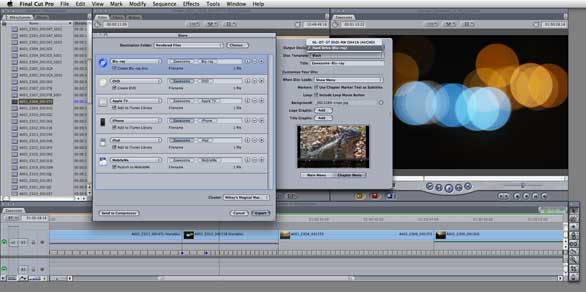
Easy Export will probably be the favorite new feature of most editors for its ease of use and time savings. Found under File->Share, it replaces Export Via Compressor. At first glance, it looks like Apple has just lifted a page from the Share interface of iMovie ’09 () , but there’s more to it than that. There are three new aspects of the Easy Export feature that significantly enhance productivity and flexibility.
• You can assign settings for target outputs such as Web, iPod, AppleTV, or DVD, directly in Final Cut Pro without having to launch Compressor, thus keeping the editor in the friendly and familiar confines of Final Cut Pro. You can assign multiple settings right from this interface, as well.
• You can assign post compression Job Actions to any of the queued targets, which are more extensive than the options you could to assign in Compressor in the past. You can, for instance, do any of the following (or more) with the click of a button: Post directly to MobileMe upon completion of compression; import into iTunes to sync to AppleTV, iPod or iPhone; publish directly to YouTube; burn a DVD or Blu-ray disc directly from this interface without going to DVD Studio Pro; or create your own post render process within Compressor, even launching Automator scripts. Then of course, you can make them available via the Share interface.
That's right—you can burn a Blu-ray disc directly from within Final Cut Pro 7. The downside is that Apple (as of this writing) still doesn't sell a Blu-ray capable SuperDrive, so you have to get a third-party drive. You can, however, burn AVCHD Blu-ray content to a standard recordable DVD disc in your SuperDrive via Share, and that will play in a Blu-ray player. DVDs and Blu-ray have a limited slate of templates to choose from, but you can at least assign custom graphics (with alpha) for background, logo, and title graphics, and even generate a chapter menu.
Another significant catch—this is the only Blu-ray support offered in the entire Final Cut Studio suite. DVD Studio Pro does not support Blu-ray in any fashion, and gets only the smallest of increments—from version 4.2.1 to 4.2.2. It does not support Blu-ray authoring, encoding, or burning. Easy Export is powerful, convenient, and useful, but that is the extent of Blu-ray support in this release. Considering that Adobe has offered Blu-ray authoring support on Intel Macs for two years, this is a startling hole in Final Cut Studio's capabilities
• All of the above can happen in the background, meaning, you can export from Final Cut Pro in the background and keep editing, even the same sequence you’re simultaneously exporting. The exported files won’t show any changes you’ve made since export started, but you can keep on working, regardless. This feature will probably be the biggest productivity boost, since you don’t have to sit and twiddle your thumbs unproductively while waiting for Final Cut to finish feeding Compressor frames, as you had to in the past. Final Cut Pro even takes advantage of Compressor clusters to accelerate the process.
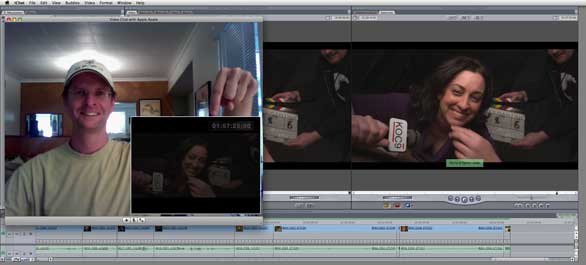
iChat Theater will be a boon to editors cutting remotely. OK, so you’ve used iChat’s video chat feature, right? What if you could send the live output of your edit session to someone over iChat? And wouldn’t it be nice to have a picture-in-picture of yourself over the video so you could talk to the remote client on video chat while editing? And wouldn’t it be nice to have a timecode burn-in on screen while you did it? Now you can. That is iChat Theater’s whole point—you can video chat with the client the same way you would normally with iChat, but instead of seeing the client up close, you (and they) see the live output of your edit session, either the sequence or individual clips you're working on. This has been possible in the past with an AJA Io or similar device, or with a second Mac and a DV hardware codec, but now it is possible with no additional hardware from within Final Cut Pro 7.
Of course, how well this works is entirely dependent on how fast your outbound internet connection is. From my home-office cable modem, I get 500 to 800 kilobytes per second for downloads, but at best about 125 kilobytes per second for uploading, which is what you’re doing when you send a video stream to someone. And of course, their download speed has to at least match that–they have to be able to catch as fast as you can pitch.

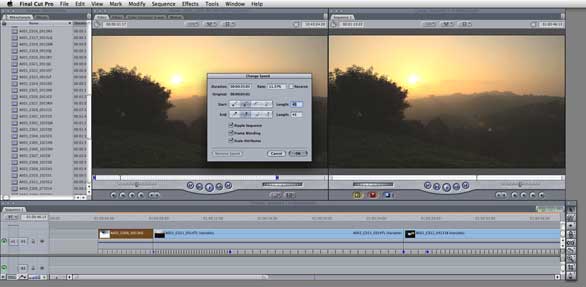
A new interface for the Change Speed window lets you set Ease In and Ease Out and has an option that lets you keep the timeline from rippling so you can doodle without pushing the rest of your timeline further down the sequence, which would mess up your audio sync. Also, a new interface element gives you keyframes in the timeline and a graphic display of how stretched your video is in time. You can either drag stretch for constant speed changes, or set keyframes for variable speed changes, right in the timeline. Unfortunately it does not take advantage of Apple’s Optical Flow technology (high quality motion and pixel blending technology from Apple’s Shake) that is present elsewhere in Final Cut Pro, Motion, and Compressor that could result in smoother frame blending. However, you can always run the clip through Motion for more accurate control and smoother results.
Native AVC-Intra Support: Final Cut Pro 7 now supports native editing of this format–you can import it and edit it directly in its native file format (as it was captured), rather than having to import and wait for it to transcode to ProRes before it is editable in Final Cut Pro. Native support also includes RT Extreme acceleration for real time transitions and effects.
Alpha Transitions: Alpha transitions are scene transitions that use an animated graphic element with a matte (or alpha channel, thus the name) to do a wipe between two shots. This demos well–palm leaves brush across the screen to transition from the beach to the bungalow shot—but I’d file this in the “fluffy” category of often demoed, rarely used features outside of travel and sports shows.
New Timecode window: Previously only available as a third-party option, now you can display a resizable floating window that shows the timecode. This is ideal for that client on the couch in the back of the room.
Improved Markers: You can now color-code your clip and sequence markers, search and jump to them, and add information to them as the clip plays, and more.
Automatic Transfer: XDCAM and P2 footage now optionally copies to designated scratch directories as soon as the media is detected, and custom metadata can be added automatically via a new Log and Transfer window. Footage can start importing as soon as media is connected, which opens the door to faster, more efficient workflows as well as potentially automated workflows.
New Redcode Log and Transfer options: When importing Redcode via Log and Transfer, you can transcode to any of the ProRes flavors on import, or just import it as native. But there are no new options for cropping or scaling which I had hoped to see, nor will the 2K layer of 4K native files play back in real time in Final Cut Pro 7. Footage shot in the default 4K 16:9 will come in at a nonstandard (for video) size of 2048 by 1152, and there are no options in Final Cut to scale this to 1920 by 1080 ProRes. Similarly, if 4K footage is shot in the 2:1 aspect ratio, no provision for cropping or letterboxing to fit into 1920 by 1080 ProRes is provided by Apple. This can be done with Red provided tools, however.
This version of Final Cut Pro includes much improved closed captioning support, the ability to globally change transitions (or cherry pick the ones you want to change in bulk), improved tabs (color coding and other improvements), trackpad multi-touch gesture support for timeline navigation, and a new version of Cinema Tools for working with file-based workflows like image sequences and Redcode footage. This is a huge improvement over prior versions, but not clearly documented within Cinema Tools.
The upgrades and new features in Final Cut Pro 7 are good, solid, worthwhile improvements that will increase every editor’s productivity. Final Cut Pro 7 will enable new, even higher quality workflows with ProRes 4444 for those demanding it, without requiring the massive storage and throughput that uncompressed media demands. Easy Export will save time, and iChat Theater solves the remote editing problem if everyone has sufficient bandwidth. Blu-ray support, while limited, is welcome if long overdue.
The Final Cut team has clearly listened carefully to customer requests, properly prioritized the features they did implement, and appears to have done a solid job implementing them. However, there are still a few things that haven’t been fixed from version 6, such as proper handling of pulldown and cadence in the Open Format Timeline capabilities, and a proper RGB processing pipeline that can handle more than 8 bits of precision (especially now, with ProRes 4444). Apple says the Y’CbCr 32 bit float is good enough. Red workflow still has lumps in it if you don’t shoot in the Quad HD setting. While Apple states that there will be performance benefits from running Snow Leopard with Final Cut Pro 7, no new features are enabled by running it.
If this version had shipped within a year after Final Cut Studio 2, I’d be thoroughly satisfied with Apple’s rate of progress. But it has been two years, and at this point I’m a bit surprised at how many long-standing issues haven’t been sufficiently addressed, and how relatively little bold new ground this version explores.
That said, the several days I worked with it prior to release, it did not once crash on either an 8-core Mac Pro/8-Core Xeon 2.93GHz () or a 17-inch MacBook Pro ().
With Final Cut Pro 7, Apple started with an already excellent market-leading tool and takes it further with significant improvements that will benefit editors doing realistic day-to-day tasks and enable them to get better work done even faster. The background processing, Easy Export, and new ProRes flavors alone make this a worthwhile upgrade for the entirely reasonable upgrade price of $299 for the entire Final Cut Studio. The plethora of other minor improvements makes for a smoother, faster version of Final Cut Pro to work with. What’s not to love about that? I would have liked to see a few more things get fixed, and seen some dated or flawed infrastructure ripped out and rebuilt, but that is not to be for this version. As a product, this is very strong, a definite A. As an upgrade, it feels like a Macworld Expo without Steve Jobs grinning and saying, “One more thing....”


